A while back, there was a question from Pete in the comments of this post:
Hello, Can you say more about the following?
"The Workday org structure is very different from the PeopleSoft department tree. Org elements are independent fields, rather than a top down data structure."
You say in a separate post that WD's Org Chart supports hierarchical relationships between orgs of the same type.
The organization structure is probably one of the finer points of Workday when compared to PeopleSoft. Having seen a few different dept trees at various companies, most of us end up putting lots of detail into the dept tree for various purposes, such as security.
In looking at our company, in PSoft we have 4 business groups. They have a regional split, Europe/US/Asia/etc. So we have 4 groups x 4 regions = 16 department trees. Then, we have business units as our next level down, then sub-region, then country, then location. As you can imagine, that's a lot of maintenance of the dept tbl and trees.
In WD, we're going through a transformation, but even if we were not, we still wouldn't end up with such a mess of data like the above.
In WD, we have the Supervisory orgs, so you still get your hierarcical relationships. Local IT helpdesk orgs report into a helpdesk mgt org which reports into an IT support org, etc. However, this is the extent of the hierarchy.
In our old world, we'd end up setting up depts by location, and putting them under the region, etc. HR in region is segregated, so they'd get certain branches of the tree. It was very hierarchical. In some cases, when we had HR people who shouldn't see other HR people, we ended up with two HR depts, who were really one dept, except we had to break it into two due to security requirements.
In our new world, we can have just one dept, and people in whatever location we want. We put the location on the employee, it doesn't have to be rolled into the supervisory org. This, is where I was going with the statement of a lack of hierarchy. (However, you can keep your strict hierarcy if you want, and mirror the PSoft tree. You would just set up your orgs in the same parent/child relationship as the dept tree.)
*****
Regarding the org chart--you have various options in the 'types' of org charts available. You can have a Supervisory org one (so like the dept tbl structure in psoft), it's your WD orgs. OR you can use the 'location' org chart--so you can search for a location and move about the org chart. If you choose location X, you get the emps in location X, regardless of their supervisory org, manager, etc. There are various types of org charts pre-built into WD--you decide whether or not to use them, and which fields to display, if so. There's a payroll group org chart, for example--we're not configuring it, but perhaps useful for payroll folks, not sure.
These org charts all run off of the various data element, so provide a different view of the data, outside the traditional org chart hierarchy.
Hope that clarifies a bit where I was trying to go with the above statements. :)
Showing posts with label org charts. Show all posts
Showing posts with label org charts. Show all posts
Wednesday, 21 August 2013

Sunday, 30 June 2013
Workday HCM - is it really that easy? Is everything really configurable?
I recently received a nice email via this blog (thanks for the emails and questions, keep them coming, it keeps me thinking), and it included the following question:
I have watched few demos and have gone through many articles and I am speechless when I see some of the them . However I dont know what is really happening in the backend and if everything is really simple and easy as they show in the demo?
Today I was thinking about this part: is everything is really simple and easy as they show in the demo?
During our sales cycle, we had lots of questions while we watched the demos, and the answer to everything was basically, 'Yes! You can do that via configuration! It's flexible!' As were finding out though, it's not completely 100% the case. For example...
Workday HCM offers some interesting 'organization chart' capabilities. If you want more details of org chart functionality, here is a free job aid on that topic that I found while searching online. Job aids posted by other companies can be quite useful, as mentioned. :) Here are a few screenshots from that document to illustrate...
When you're in WD, you can click on the blue 'org chart' button from a Worker:

Then, it brings you to the Org Chart page in WD. From here you can navigate up/down and around the Org Chart:

It's nice looking functionality, especially if you don't have anything. Of course like every other HRMS, it's not as great as the niche player software applications, such as OrgPlus.
How does it look from the backend/setup perspective? It's quite simple to configure, actually. There are multiple 'views' of the org chart, or various org chart options. So you can have an 'Employee' org chart (as above). Or you can have a 'location' org chart or a 'supervisory' or chart or a 'pay group' org chart. Then, you can provide different data elements on these various views.
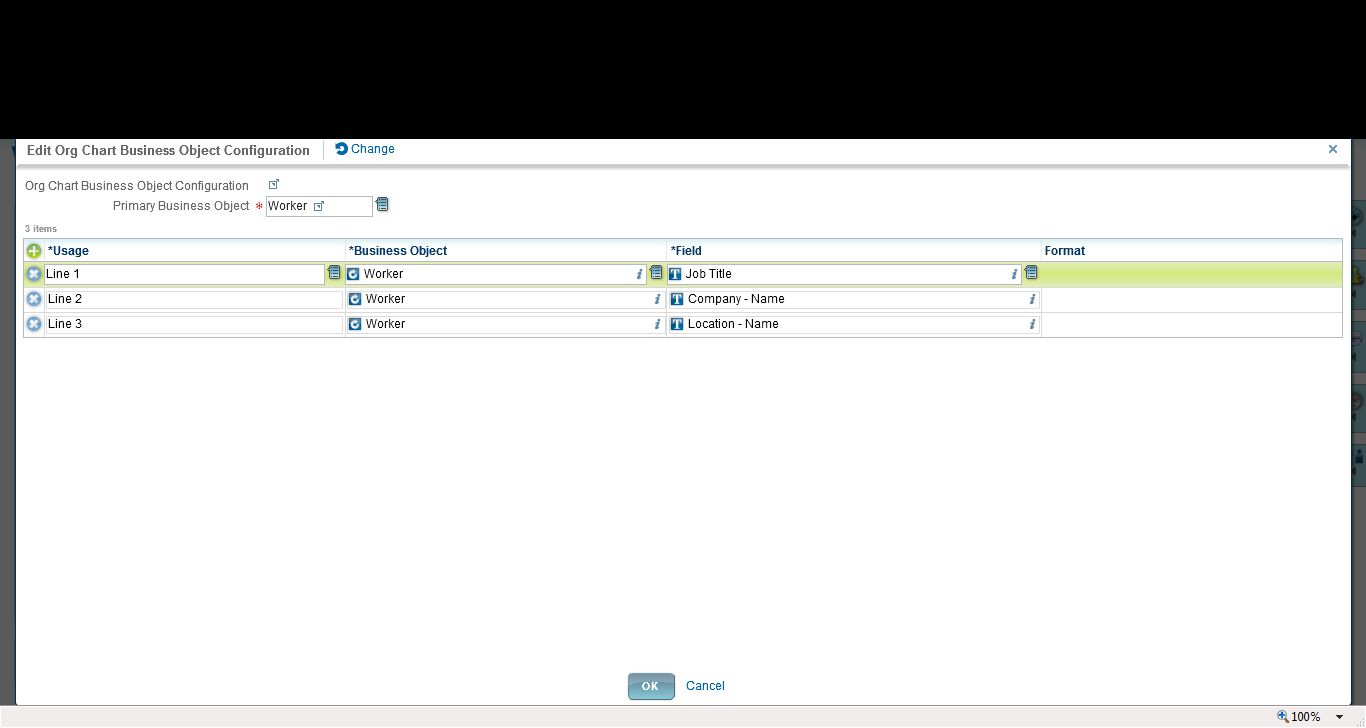
Each is quite simple to set up, just point and click to select the org chart fields to display, as well as whether or not to display the emp photo:
I have watched few demos and have gone through many articles and I am speechless when I see some of the them . However I dont know what is really happening in the backend and if everything is really simple and easy as they show in the demo?
Today I was thinking about this part: is everything is really simple and easy as they show in the demo?
During our sales cycle, we had lots of questions while we watched the demos, and the answer to everything was basically, 'Yes! You can do that via configuration! It's flexible!' As were finding out though, it's not completely 100% the case. For example...
Configuring Org Chart functionality in Workday
Workday HCM offers some interesting 'organization chart' capabilities. If you want more details of org chart functionality, here is a free job aid on that topic that I found while searching online. Job aids posted by other companies can be quite useful, as mentioned. :) Here are a few screenshots from that document to illustrate...
When you're in WD, you can click on the blue 'org chart' button from a Worker:
Then, it brings you to the Org Chart page in WD. From here you can navigate up/down and around the Org Chart:
It's nice looking functionality, especially if you don't have anything. Of course like every other HRMS, it's not as great as the niche player software applications, such as OrgPlus.
How does it look from the backend/setup perspective? It's quite simple to configure, actually. There are multiple 'views' of the org chart, or various org chart options. So you can have an 'Employee' org chart (as above). Or you can have a 'location' org chart or a 'supervisory' or chart or a 'pay group' org chart. Then, you can provide different data elements on these various views.
Each is quite simple to set up, just point and click to select the org chart fields to display, as well as whether or not to display the emp photo:
Looks great, easy to use. However...
Configuration Limits on the Org Chart
1. You have a limited number of fields. As above, you can see Lines 1-3. Then you can add in the photo and the organization (such as in the Supervisory Org shown in the online functionality). But otherwise--you cannot add more fields. You cannot add a line 4 or 5, for example. Our organization wanted to show more data, so then we started to consider workarounds, to make a calculated field to be able to squash more data into line 1, for example (which WD allows you to do). However...
2. The org chart only allows you to choose/display 'public' fields or calculated fields based on those public fields. Well sure, on one hand that makes sense. If everyone is viewing the org chart, then it needs to be public fields. However...in our case, we wanted to show BOTH job title and business title. Business title is NOT a public field. Therefore we cannot reference it in our org chart. Sidenote: someone on Community put in a Brainstorm for the exact same requirement, to allow them to show biz title in the org chart. So far, it's not been picked up by WD for a future release.
3. The overall configuration is a little lacking. For example, we often want some flexibility to not display people on long term disability leave. Or in the specific case of Europe, where people have a termination reason of 'garden leave' (so they are released prior to their 'true' term date, often 3-12 months), while they are active Workers, they are no longer actively working for the company and therefore we shouldn't confuse people by showing this data. There is no way to easily filter out 'active' workers in scenarios such as these from displaying in the org chart.
In Summary
Yes, Workday is configurable and flexible, however, I say this with a pinch of salt. It may not be configurable to *exactly how your company wants it*. And that, my friends, is the negative of a SaaS solution. You must also be flexible in your business requirements to be able to use this functionality, and sometimes you must bend your requirements to meet how the software has been designed.
A tip
You just need to be aware of your business requirements. It's like everything else when dealing with a SaaS solution (regardless of the vendor). In this example, if you are evaluating WD, you need to be aware and document your requirements in advance. If your requirement is just 'to have org charts' because you have little or no functionality currently, then no problem.
If your requirement is to 'have org charts with 7 lines of data, and to be able to suppress certain data on certain levels of the org, along with hiding photos in Europe and on and on', then WD will not be able to meet your needs. So it's important to know your requirements early on, such as in the sales cycle, rather than getting to the configuration stage and suddenly being disappointed that, 'I can't configure it the way I want'.
So 'is everything really configurable?'
Maybe--it depends on your requirements. :)
Subscribe to:
Posts (Atom)