Showing posts with label configuration. Show all posts

Thursday, 16 October 2014

Tracking exempt status in Workday

A reader recently sent me a note, asking about how to track Exempt/non-exempt status.  I thought this info might help others, so here it is.

Workday allows you to track exempt status on a job profile, as do most HRMS these days.  A nice thing about Workday, however, is that you can attach different exempt statuses to one job profile based on location:


In previous HR systems that I've seen, you'd be stuck creating new jobcodes, profiles, positions, etc., each time that an exemption status changed, in order to track that status.  Prior to version 11 WD was in a similar situation, so nice to have seen them build out this functionality.

A few things to keep in mind though:

  • You need to have your processes locked down tight, as to how you will use this tab.  Will you assume that any state values are exceptions to the country value?  
  • Who is pulling any government reports, and where do they come from?  The use case presented on this one is that employees in California may be in the same job as someone in Texas, but due to California legislation, they are non-exempt rather than exempt.  There are a variety of ways to accomplish this reporting....

1. Put the exceptions into WD.  Document that a country is the norm and only exceptions are documented.

2. Don't put the exceptions into WD.  Establish your procedures outside of the system to assume all California jobs of a certain profile (grade level x etc) are non-exempt--in which case put employee work location into your report.

3. You could always put ALL the data into WD...so 49 exempt states and 1 non-exempt.  I'm not endorsing it, but I'm saying it's an option.

There are lots of options here and WD offers a lot of flexibility on this front.  To be successful, you need to ensure that your data entry procedures are watertight and that the reporting folks are working off of them consistently.

Tuesday, 17 June 2014

Workday Custom Objects in Action

Workday Custom Objects (CO going forward here) are easy to set up and configure, but how about from a user or data entry perspective?  Here we go:

1. You can access from multiple points on the person's record (see red boxes, for Additional Data menu).  It's nice that you have multiple paths to the same place:

 2. Once you've chosen the menu, you are then given a choice of which Custom Object you'd like to use.  In some ways, this isn't intuitive for the user at this point.  It's basically a collection of all the active Custom Objects.  So the data elements themselves are not related to each other (Apparel, Commute, etc.).  It's just a collection of 'Workday doesn't have these fields so we've created them' and stuck them in one place.

In my perfect world, I'd want to put 'Commute' with the Address data, for example.  Why?  We use the 'Commute' CO to track distance from home to work.  In Europe it's often woven into taxable benefits, such as when someone receives a company car or fuel benefit.  The greater the distance, the bigger the taxable benefit.  So if the data entry person is entering a new address on an employee, they need to remember to come over here and update the Commute value as well.

The Data Entry Pages


3. Since we spoke about Apparel in the setup example, let's stick with this one.  So here is the CO on Apparel, from a user's perspective.  It's pretty easy to choose an apparel type and size:

Keep in mind, this is Workday delivered sample data.  It's helpful for seeing how Workday envisions the pages to work if you're in a demo environment.

I'd like to point out a weakness about CO functionality however, using this example.  While we all say how we support standardization and global processes, I'd be much happier with this page if we could limit or apply the values to only certain regions or countries.

As you can see, it's one field with one big dropdown list.  (CO security is driven when setting up the object, so I'm not worried on that front, that a data entry operator would not have unauthorized access).  However, looking at this Apparel example, sizes vary around the world.  For example, if i were to buy a pair of shoes, I'd have to know my size:
US:  7.5     UK:  5.5    Europe:  38
Sizing is not a universal concept.

Workday does not let me limit this pick list in any way, shape or form.  So data entry folks around the world are left with this big list.  The only thing you can do is to make sure you think ahead and apply smart coding when setting up the values.

So the shoe pick list would either need to start the values with a region or country code:
US 7.5
US 8
UK 5.5
UK 6
EU 37
EU 38

OR we'd need to make the mapping and plunk everything into one line, so that our pick list looked like this:

US 7.5 / UK 5.5 / EU 38
US 8 / UK 6 / EU 38
etc.


It's not the end of the world, but I seek to minimize data entry mistakes by getting clutter out of the way.

Error messages


Workday does come with built in functionality, it's smart enough to know when I'm trying to enter a duplicate.  Would be happier if it was a little friendlier out of the box, however.  With that dollar sign in the error box, it looks a little clunky.


User specified validation rules


Workday does allow you to put on validations, so if the data entry person enters a wrong value, you can trigger an error message to inform the person to enter more appropriate data.  This is the closest I can get to ensuring that correct data entry is done (since I cannot limit the list overall on the front end).

So let's say that a data entry person accidentally chooses an incorrect value from the pick list, here is the error message:
 

Here is how it gets triggered.  The functionality of setting condition rules is consistent throughout the application, so if you know how to do one of these from the business process page or reporting pages, you know how to apply it here too.  Same functionality.  On one hand, I like the consistency for the back office folks setting these up:


As well, you get to specify your exact message in such a scenario:


From a front end user perspective though, I'd rather that the data entry operator not see the value in the first place, rather than have to go through a big dropdown and accidentally choose the wrong one, and then have to re-enter the data.  Fully understanding that this is sitting on the overall WD platform, however, so it needs to use their existing tools.  I'm just saying I'm not overly happy with the lack of limitation possibilities and having to build in validation rules after the fact.  But I get that this is how the application works.

Overall:


  • It's a 'configuration' rather than 'customization' option, so good from that perspective.

  • The user experience isn't as slick as the rest of Workday.  Trying to incorporate COs into the app seems patchwork and haphazard.
 
  • You have the option to use Effective Dated COs, at least for Worker.  While it would be great to have additional ones, Worker is the most critical.

  • Big Disadvantage:  Currently you only get 20 of these per business object (such as Worker), unless you're a Big Data customer, then you get 100.  As someone pointed out on the WD Community site, this obviously isn't a technical application limit since it is granted to some customers.  There has been a brainstorm out since 2012 to increase those counts for us non-Big Data peons, and according to the site it's targeted for WD 23 (Aug 2014 in Production).  Fingers crossed that this will open up more possibilities for us.
 
  • Another disadvantage:  Lack of integration into the Business Processes from a data entry perspective.  My HR colleagues who are more on the front end of process design try to avoid these Custom Objects whenever possible.  They like a process to flow along in a logical manner and give much thought into how and where the data gets entered.  They like to set reminders and make things as foolproof as possible.  The location of this data under the 'Additional Data' menu leaves it as a bit of an orphan, a collection of 'extra' data items.  They prefer to instead cannibalize existing unused fields on the pages where data entry is occurring (shudder!) so that the data entry can be in one place.  
 

Any other options?


The eloquent Naomi Bloom suggested on Twitter that I think some more on this topic and WD's options.  Custom Objects are really WD's main mechanism in the way of user-defined fields.  As you can see, it can be a powerful option, in particular if you are used to a non-configurable environment.

There is one more option that we've been pulling out of our sleeve, using 'Custom ID' functionality.  If COs are the powerhouse of user-defined fields, Custom IDs are next best option if we want to cannibalize and re-purpose something.  I'll put together a separate post on that one.  To be honest I'm not really proud of how we're using that one, as we're stuffing data into fields in a way that was never its intended purpose, but in the interest of full disclosure, I'll show you what we're misusing.  In particular, we were afraid of using up our CO allotment of 20, so we've had to go the Custom ID route to store additional data, but from a systems standpoint, it's less than exemplary.


Monday, 26 May 2014

Workday IDs and codes

In our current PeopleSoft world, we have processes and controls around codes, how we set up codes (we don't use smart coding, but instead next sequential), and interfaces tend to use the same logic to select certain populations, so it becomes a copy/paste exercise for new interfaces.

Workday provides a lot more on the coding front, so a few thoughts here.

Some foundational data operates with these options:

1. Workday ID


When you set up a new value, let's say you're setting up a new value of 'New York City' in the Location table, Workday generates an ID for that automatically in the background when you save the value.  It looks something like this, length 32:

z13a7c16a03333c4a44bb09afbdf72q73
 
The average user does not see this value, but may view it (if granted security) to 'View Integration IDs'.  Some other key points I've picked up on this one:
  • It's a globally unique code across all customers
  • It's also unique across instances (so your Location will have different Workday IDs in your production vs. sandbox tenants)

2. Reference ID


This one is a customizable value, or you can let WD set it for you.  In this case we'd have:
Location_ID = New_York_City_site if we allowed it to default.  But you could override it to a value that makes sense to your company.  In our case, we have a code structure for locations that is set up by the facilities group and used universally at our company.  So our Reference ID is overriden when setting up a location, to be our company generated location code.
  • You're not required to have reference IDs, but can have one or many per item if you wish
  • This one will be the same across your tenants
 

3. External IDs


I am rather digging this one, as we built a custom page in psoft that does basically the same thing.  :) Let's say that you have your NYC location with a Reference ID of 12345, but your payroll system requires a leading zero there, so you need to send 012345 to payroll.  In a psoft vanilla world, you'd hardcode that into your SQR or app engine, to append a 0 as a part of the interface.  WD allows you to set up this code on the location itself, so your user online is creating the location and then adding a row to set up 'Payroll System X' = 012345.  Then, the developer only needs to reference the 'Payroll System X' row when building the interface.  

It's also nice that you can have multiple External IDs for various systems, so if you have 10 different downstream systems that want 10 different codes for our NYC office, we can set that up on the location.

4. Then other tables have different 'code' options.  

 
Let's look at Ethnicity.  WD delivers some sample values, but you're free to configure your own:


Interesting to me here is that you can set up the 'map to' option.

Overall thoughts on IDs

We're still in the early days of being live with WD in the US.  Most of our integration consultants seem to be learning WD as they develop our interfaces.  
 
In general, I suspect we're not setting things up in the most efficient manner.  Like often in WD, its flexibility appears to be our undoing, but we've only figured out after the fact in some cases how we actually *should* have set things up.
 
However, there are definitely more options here than in PSoft, so I like it from that angle.

It will be a bit of a learning curve as currently we're in the midst of HR transformation, so folks who never maintained (or knew about) the codes needed by payroll will now need to be aware of them in order to maintain them.

Sunday, 6 April 2014

Pleasantly surprised

A while back, I mentioned looking at address data.  While we mapped from PeopleSoft to Workday and made decisions to combine fields where we had to, we had a country where WD made the field required, while we would call it optional.  I spoke with our data entry expert in country to confirm it is not used and to confirm that it's not existing in local payroll.  I checked online as well and everything that I found aligned with this data being optional.

I put in a Brainstorm making this request to convert it to optional.  Three weeks later it had hardly any votes, but someone from WD responded to it and asked for the legal source, as their sources said that it was required.  I missed getting a notification at this point that someone had responded, so I did not respond.  However, the same WD employee then responded a few days after, that indeed it should be an optional data element based on new research, and that it was targeted for WD 21 to be updated.

On one hand, I have no idea how they can get to WD21 with no one else noticing this, except that we are not a pharmaceutical company, so maybe our global footprint differs from other big customers.

We had already programmed our conversion logic to stick 'unknown' in the field (no field validation), which was going to look ugly from a self-service standpoint.  Happy to be able to lose that logic and instead leave the field blank.

As a PSoft customer, our management made a strategic decision not to apply patches.  We don't run payroll out of PSoft in Europe, so we can do that.  Occasionally, when something is noticed by the users and it is deemed critical, we will extract that bit of code out of a project, and our developers will manually apply just that bit.  As you can imagine, whenever we would log a case with PSoft customer support, it would be instantly closed as you are not on the latest code line.

I realize this is a quick little fix by WD for something that should not have been wrong in the first place, but quite pleased at how this one has turned out.

Monday, 17 March 2014

Custom Labels in Workday

I mentioned yesterday about struggling a bit to come to terms about Workday's functionality in this area, in relation to not being able to change labels and field behaviour as it relates to Address fields in Workday.  So as a follow-up today, a few thoughts on where Workday does have some Label Customization options.

What is the functionality?

  • Workday delivers Maintain Custom Label task, so for certain field labels in certain areas, you can choose to override those with your own company specific terms.


What are the areas?

  • It centers around three areas:  Global, Merit or Talent.

 So how does that work?
  • For these areas, WD allows you to override certain field labels with your own field labels.
  • 'Global' includes these three items: 'Workers', 'Contingent Workers' or 'Employees'.  So if your company calls them 'Team Members', 'Temps' or 'Minions', you can replace these terms globally in WD with your own terms.  'Global' does not include any other terms/labels, aka address labels. (boo-hoo!)
  • You also then have to include the possessive and plural forms too.

 My thoughts:
  • We have not changed any 'Global' labels, as we currently use the terms of Employees and Contingent Workers, and we'll get people used to the new 'Worker' term over time.
  • Merit and Talent are a little more useful as some of the fields in this area ('merit', 'competency', 'target', etc.) are ones where we use company specific terms such as 'year end process'.
  • Although some of their other terms in this area such as 'development' or 'goal' are fine for us, but recognizing how other companies often have specific terms in these areas.

 Usability
  • It's easy functionality to use.  It's just a list of fields and you can choose to fill in overrides where you want to have them.
  • It is multi-language enabled, so you can do label overrides in multiple languages.  That being said, when we have a company-specific term, we tend to keep the English version. 

 Following the Debate
  • I see that customers have requested the ability to change the above listed labels and these have been added over time.
  • Some customers think that there should be more of an option to make these changes across the application.  As an example, it can be confusing if you have multiple HRIS for recruitment vs core HR and use different terms for 'employee' and 'worker'.
  • Other customers think that different label options dilute the application's power of standardization.

 The Workday technology behind the scenes?
  • I wish I knew what it was or why this is so complex to do.  As a counter example, we have another major SaaS provider as our recruitment system, as we can change label names and even had the option to provide an Excel of label translations.
  • When researching the address option I mentioned yesterday, and looking at the Brainstorms out on Customer Community, I see that someone had requested that 'Postal Code' be renamed as 'Zip Code' when the country is US.  The response from Workday was to clarify whether a Label Override for customer entry was being requested, or rather that Workday should make that change overall in the application (so that every customer with a US address would see 'zip code' instead of 'postal').  
  • So I guess address label overrides are not as pressing a need as some of the development or performance ones.  

But I'm still curious as to whether this is a technical limitation of how the application is built, to not open up labels globally for customer entry, or more of a strategic direction to lock down this option.

Sunday, 16 March 2014

Address Data in Workday - SaaS vs non-SaaS

As a large multi-national employer, we have employee, location and emergency contact addresses from virtually every country in the world. 

Workday defines country address formats for you.  Looking back through the historical updates, I can see that they have evolved over time, to add more state data, update to make fields required/un-required, etc.

We have other HR SaaS systems in the areas of recruitment and training data.  I am struggling with the move from an ERP to a SaaS in the core HR space however.  As we've been running through our pre-conversion run, a few thoughts here, specifically about address data.  Both applications offer specialized, per country address formats.

Workday (SaaS) advantages:

  • WD delivers data such as states, so we don't have to worry about getting that setup data.
  • WD has done the leg work to figure out an appropriate address format per country.  Not sure that it's 100% there, but we are able to map to equivalent fields, so fingers crossed.
  • WD has some validations in place, such as US postal codes are matched against US states, so the user gets an error if something is amiss.
 

PeopleSoft (ERP) advantages:

  • You can (through normal, online configuration) hide and unhide fields.
  • You can (through normal, online configuration) change the label names.
  • While a core list of states are delivered in major countries, you can add more, change the existing ones, etc.
  • You can, via customization, make a field required or un-required.


My wish list...

I envision the next generation of SaaS tools will become a little more flexible on some of these fronts.  Or maybe it's more wishful thinking, but here's where I'm seeing some challenges:

  • We have configured PSoft to replicate the address formats needed by our downstream payroll systems.  Like many other companies in Europe, we have many payroll systems, often 1 (or more) per country.  IF we do not configure the core HR system to match payroll, then potentially people are putting data into fields that do not get interfaced.  While it might be tackled via training...
 
    • We're moving toward more of a regional centralized shared services model.  While the teams cover a handful of countries now, in the future, it will be a mega back office operation covering 50+ countries so we need the system to be smart, rather than expecting an entry person to be on top of the details or to have to look them up.
 
    • Employee self-service will allow an employee to say, use Address 3 in WD, but payroll only has Address 1 or 2.  So it becomes an audit after the fact or a very complex business process if you invoke validation.
 
  • Due to said payroll systems, we'd like to control the required fields in the HRIS in the same manner as payroll.  So if payroll requires city, then we need to have it required in the HRIS.  With WD, we have no possibility to do so and they are supposed to be our source.

  • We'd have a way to impose field length limits on address data elements in WD.  As those payroll systems downstream all have field limits, it would be nicer if we could impose the same in the HRIS at the data source, rather than losing data in the interface process when it will just cut out those values that are longer than the receiving system can handle.
 
  • WD has post code validations for the US, but not for us in Europe.  I've seen some customers request more functionality in this area, and assuming they can find a source, seems like this will get there in time.
 
  • I wish it would get really smart for us and use the address data in related processes.  For example, in Europe, when you receive a company car, you are taxed on it as a benefit.  Some countries take into account the kilometers between your home address and the office address (a longer distance = more benefit = higher tax rate).  Currently in our pre-WD world, an HR person goes to Google maps and types in the details to figure out the kilometers and enters it into the payroll system.  While WD delivers a field for this data (score 1 WD, as PSoft does not have a home for this data element), in my perfect world, the system would do some connecting in the background and figure out that your address has changed and call up a link into google to figure out the km for you.   My perfect next generation SaaS would have things like this built in from the get go.  :)

Saturday, 8 March 2014

Required vs non-Required fields in Workday

I've been looking further at the Disability data pages in Workday, and do these meet the need of the data required by the various country payroll providers.  Typical analysis tasks exist like you'd do for any system:
  • Understand the business requirements, fit gap for the data elements
  • Ensure that the data home is palatable for developers and report writers
  • Make the data entry as easy, friendly and automated as possible for the data entry teams
  • Think holistically, will this definition work across the countries?
  • Consider long term, is the entry sustainable, will this be a self-service item, etc.
In essence, it's a balancing act of these various pieces, whenever I design a solution. 

Occasionally in PeopleSoft, an entry person has to put default data into a field to be able to get into a field that they must use, so be it.  On the flip side, if there is an important data element or one that if not populated will break an important interface such as payroll, we've been known to make the quick and dirty customization in PSoft to make the optional field required.  (Technically it's a customization, but an easy one to turn on the checkbox.  It's more of an effort due to our change management process to make/test this 'code change'.)

In looking at Disability in Workday, only the Disability code is required, none of the additional fields are required.  As a SaaS solution, there is no option to customize to make these fields required.  My issue here is that country-specific interfaces require a set of fields as mandatory for disability.

Where this is going to be a challenge for us:

  • Like many companies in Europe, our Shared Services data entry team supports multiple countries.  
  • Some data entry will always be country specific: Name formats, Addresses, Disability, Labor Agreements, Establishment for France, Brazil etc.  
  • Often, it's consistent across a country, but the system just makes all the fields open.  Thus the 'Flexible' description.
    • Fields can be entered/non-entered for a country
    • Fields have no setup values behind them, they are free form

My concern is that in this example, Disability is not a daily entry task, and it differs greatly per country.  We cannot dictate entry at a system level, beyond giving an entry professional access to the page.  There are downstream, i.e. Payroll, impacts if the person does not do the entry correctly.

So we'll need to prepare entry documentation per country, that the entry person will need to look up and use each time they need to enter this data.  With WD's regular updates this will be a challenge to keep current.

While this item alone is not huge (we're not hiring a disabled person every day, although in some ways it would be better if they were doing the data entry every day, then the rules would be memorized), when you start to add up the various items that will require similar efforts, it starts to add up.  For fields that do not break an interface but are important for business reporting, it will become a matter of building audit reports and chasing up any 'required' fields when empty.

I realize this topic continues to come up on Workday's Community site, the ability to make a non-required field 'company required', and knowing nothing about the guts of Workday, I'm suspecting it's a pretty big ask since it's not getting picked up.  I am starting to get a little nostalgic for a non-SaaS HRIS though, as I consider:

1. Broken interfaces due to incomplete data
2. Additional auditing needed
3. Making extra documentation so that people know what fields are required.

Also fully recognizing that this is not a 'Workday' issue per se, but moreso a 'SaaS' issue overall, that configuration is limited to the vendor's offerings.

Wednesday, 5 March 2014

Workday's configurable fields

Workday's configurable fields is always an advantage mentioned in the sales cycle, so some brief thoughts on this topic as I've had a chance to try it out from a European perspective.  In conjunction with Workday, we are also implementing a managed services, outsourced payroll provider.  As a part of that the new mantra has become, 'if it's in payroll and not a calculated element, we need to make Workday the source and interface the data'.  So any employee demographic data or 'flat' data will need a home in Workday.  This differs from our current landscape where we have certain fields that could be housed in PeopleSoft, but the payroll system was really considered the owner of the data so data was maintained more consistently there.

So I'm doing a lot of analysis and solutioning these days of historically 'payroll' data.  Currently, as payroll implementation discussions are happening in each country, the teams are reviewing the data in payroll and forwarding over questions, as to where/how it can be stored in Workday. 

I've had a chance to review the Disability setup in Workday, based on various countries requesting this data for payroll.  In Europe, a lot more data is potentially tracked than in the US, and it differs per country.  There are government reporting requirements, and as I've heard from some HR in country, there are some tax benefits for the company if you employ people who fall under this classification.

In our current PS environment, there is one page with any relevant field, and a data entry person has to know which is relevant for the country.

WD lets us turn fields on and configure at a country level, so if your employee belongs to country X, then you get the relevant fields for country X.  Just a quick visual here, the first is a European country with all options turned on.  The second is the equivalent for a US employee.  There are more fields on both pages, but just wanted to give you a snippet of how the differences appear:


This will be quite helpful from a data entry perspective, as we'll be able to keep the entry screen clean, with only the relevant fields for a country.

From an analysis perspective though, this is why WD takes so long some days.  We don't have this level of granularity in the current system, so going out to compare to the payroll system, confirm with the relevant HR, payroll or compliance/reporting people the mandatory vs. optional fields then to document at a country level, do the configuration, define the data load, get the data from the current source, load, test, etc. all takes a lot of time. 

Overall, I like what I'm seeing, this is an improvement over PS.


Wednesday, 21 August 2013

Organization elements in Workday

A while back, there was a question from Pete in the comments of this post:

Hello, Can you say more about the following? 
"The Workday org structure is very different from the PeopleSoft department tree. Org elements are independent fields, rather than a top down data structure."

You say in a separate post that WD's Org Chart supports hierarchical relationships between orgs of the same type.

The organization structure is probably one of the finer points of Workday when compared to PeopleSoft.  Having seen a few different dept trees at various companies, most of us end up putting lots of detail into the dept tree for various purposes, such as security. 

In looking at our company, in PSoft we have 4 business groups.  They have a regional split, Europe/US/Asia/etc.  So we have 4 groups x 4 regions = 16 department trees.  Then, we have business units as our next level down, then sub-region, then country, then location.  As you can imagine, that's a lot of maintenance of the dept tbl and trees.

In WD, we're going through a transformation, but even if we were not, we still wouldn't end up with such a mess of data like the above.

In WD, we have the Supervisory orgs, so you still get your hierarcical relationships.  Local IT helpdesk orgs report into a helpdesk mgt org which reports into an IT support org, etc.  However, this is the extent of the hierarchy.

In our old world, we'd end up setting up depts by location, and putting them under the region, etc.  HR in region is segregated, so they'd get certain branches of the tree.  It was very hierarchical.  In some cases, when we had HR people who shouldn't see other HR people, we ended up with two HR depts, who were really one dept, except we had to break it into two due to security requirements.

In our new world, we can have just one dept, and people in whatever location we want.  We put the location on the employee, it doesn't have to be rolled into the supervisory org.  This, is where I was going with the statement of a lack of hierarchy.  (However, you can keep your strict hierarcy if you want, and mirror the PSoft tree.  You would just set up your orgs in the same parent/child relationship as the dept tree.)

*****
Regarding the org chart--you have various options in the 'types' of org charts available.  You can have a Supervisory org one (so like the dept tbl structure in psoft), it's your WD orgs.  OR you can use the 'location' org chart--so you can search for a location and move about the org chart.  If you choose location X, you get the emps in location X, regardless of their supervisory org, manager, etc.  There are various types of org charts pre-built into WD--you decide whether or not to use them, and which fields to display, if so.  There's a payroll group org chart, for example--we're not configuring it, but perhaps useful for payroll folks, not sure.

These org charts all run off of the various data element, so provide a different view of the data, outside the traditional org chart hierarchy.

Hope that clarifies a bit where I was trying to go with the above statements.  :)

Tuesday, 16 July 2013

Business Processes in Workday HCM

I was able to attend the Workday Business Process Fundamentals course a few months back.  It's an online only course, 4 hours/day for 2 days.  A few thoughts...

Business Process (BP) Functionality


Business Processes have been described as 'the heart of Workday'.  If you don't have the BPs built properly, you cannot function.  A BP in WD is the set of tasks that need to occur as a part of an HR process.  It is here that you establish and associate all the nitty gritty details such as approval chains, notifications, escalations, , validation, help text on the step, security of who is seeing what step, etc.

Examples of business processes include:  Hire, Propose Compensation, Create Position and Termination.  Workday delivers all the basic ones, and you just need to make the business decisions of how your process should work, defining the approvers, etc.

From a user perspective, they are easy screens to use--point and click, similar to using Excel.  Anyone can set up a BP...however, it requires some skill and businss understanding to set up the BPs in the most efficient manner. 

Considerations when setting up a BP


  • Think about the future state process.  It seems that many companies are implementing WD in the US first, and then other countries later.  When setting up processes, you need to give it some thought as to:  Will you have 1 big global Hire process or duplicate the Hire process per organization/country/region, etc?  Otherwise, if you are not sure of your design, you will potentially need to change your BPs in a Production system when other countries come on board.  Of course, if you duplicate processes and apply country specific rules, this will cause one result with troubleshooting and maintenance.  If you build everything into one big one, it's a different result as far as troubleshooting/maintenance efforts.  Both solutions will require work--it just depends on how big your company is, how different or standard the processes are, etc.

  • Standardise where possible.  This one goes without saying, as WD is built on the premise that your HR processes are standarized.  However, when we started to do some analysis of local processes, we found quite a bit of variation, as well as local needs.  For example, we had a lot of 'post-hire' activities, such as generating a parking permit in one facility vs. confirming that a safety training occurred in a plant with previous issues.  We made a decision that any 'localized' activities that did not involve system tracking would not be embedded into the business process.

  • How many approvals do you need?  We debated this one quite a bit, as we had defined some processes with a 'Manager +1 approval' level, but then one part of the business wanted to add 'Manager +2'.  It would have impacted our process design and cause some if/then work in our processes.

Tips for designing your Workday Business Processes


  • Build the process flow on paper first, rather than in the system.  Sometimes, it's helpful to see the process in action, in the system.  However, if your HR colleagues cannot agree in the first instance to a proposed process flow, then it's of little use trying to automate that uncertainty.
  • Gather the requirements before you start to build them.  For example, knowing the user groups who can initiate the transaction, where help text is needed, etc.  I would suggest to use something basic such as Word, and to fill in the details before beginning any build activities.

Overall thoughts


It's helpful functionality, and will allow for a lot more automation than we are able to generate out of our PeopleSoft system today.  In addition, depending on how detailed you go with them--they will make for a nice user experience, especially for our managers, who will suddenly get a lot more visibility to data.  Not sure how much the managers will appreciate suddenly being initiators of HR processes though!

As well, for those of us who are worried about automating outselves out of a job(!) WD's BP's actually create more work, as someone needs to maintain or design new ones, as well to monitor the queue, for processes that have failed or are somehow stuck.  :)

Sunday, 30 June 2013

Workday HCM - is it really that easy? Is everything really configurable?

I recently received a nice email via this blog (thanks for the emails and questions, keep them coming, it keeps me thinking), and it included the following question:

I have watched few demos and have gone through many articles and I am speechless when I see some of the them . However I dont know what is really happening in the backend and if everything is really simple and easy as they show in the demo?

Today I was thinking about this part:  is everything is really simple and easy as they show in the demo?

During our sales cycle, we had lots of questions while we watched the demos, and the answer to everything was basically, 'Yes!  You can do that via configuration!  It's flexible!'  As were finding out though, it's not completely 100% the case.  For example...

Configuring Org Chart functionality in Workday


Workday HCM offers some interesting 'organization chart' capabilities.  If you want more details of org chart functionality, here is a free job aid on that topic that I found while searching online.  Job aids posted by other companies can be quite useful, as mentioned.  :)  Here are a few screenshots from that document to illustrate...

When you're in WD, you can click on the blue 'org chart' button from a Worker:


Then, it brings you to the Org Chart page in WD.  From here you can navigate up/down and around the Org Chart:


It's nice looking functionality, especially if you don't have anything.  Of course like every other HRMS, it's not as great as the niche player software applications, such as OrgPlus.

How does it look from the backend/setup perspective?  It's quite simple to configure, actually.  There are multiple 'views' of the org chart, or various org chart options.  So you can have an 'Employee' org chart (as above).  Or you can have a 'location' org chart or a 'supervisory' or chart or a 'pay group' org chart.  Then, you can provide different data elements on these various views.

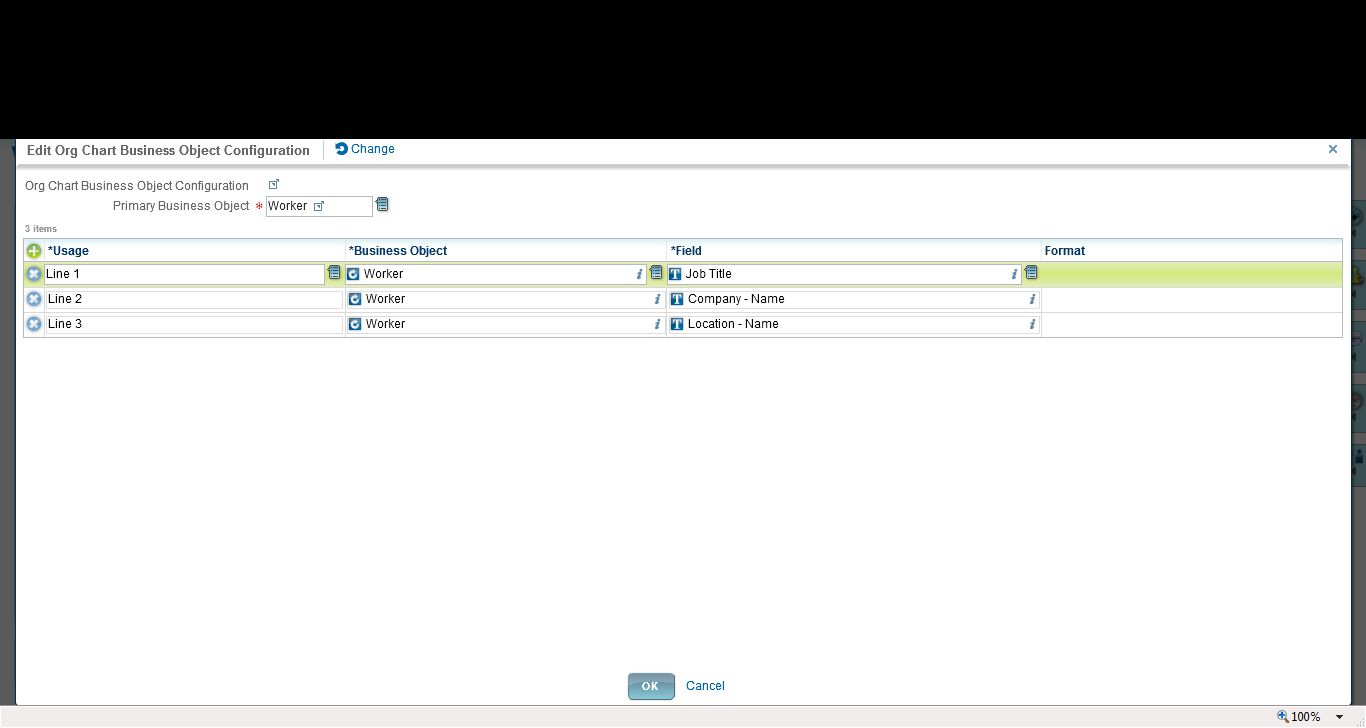
Each is quite simple to set up, just point and click to select the org chart fields to display, as well as whether or not to display the emp photo:


Looks great, easy to use.  However...
 

Configuration Limits on the Org Chart

 
1. You have a limited number of fields.  As above, you can see Lines 1-3.  Then you can add in the photo and the organization (such as in the Supervisory Org shown in the online functionality).  But otherwise--you cannot add more fields.  You cannot add a line 4 or 5, for example.  Our organization wanted to show more data, so then we started to consider workarounds, to make a calculated field to be able to squash more data into line 1, for example (which WD allows you to do).  However...
 
2. The org chart only allows you to choose/display 'public' fields or calculated fields based on those public fields.  Well sure, on one hand that makes sense.  If everyone is viewing the org chart, then it needs to be public fields.  However...in our case, we wanted to show BOTH job title and business title.  Business title is NOT a public field.  Therefore we cannot reference it in our org chart.  Sidenote:  someone on Community put in a Brainstorm for the exact same requirement, to allow them to show biz title in the org chart.  So far, it's not been picked up by WD for a future release.
 
3. The overall configuration is a little lacking.  For example, we often want some flexibility to not display people on long term disability leave.  Or in the specific case of Europe, where people have a termination reason of 'garden leave' (so they are released prior to their 'true' term date, often 3-12 months), while they are active Workers, they are no longer actively working for the company and therefore we shouldn't confuse people by showing this data.  There is no way to easily filter out 'active' workers in scenarios such as these from displaying in the org chart.
 

In Summary

 
Yes, Workday is configurable and flexible, however, I say this with a pinch of salt.  It may not be configurable to *exactly how your company wants it*.  And that, my friends, is the negative of a SaaS solution.  You must also be flexible in your business requirements to be able to use this functionality, and sometimes you must bend your requirements to meet how the software has been designed.
 

A tip

 
You just need to be aware of your business requirements.  It's like everything else when dealing with a SaaS solution (regardless of the vendor).  In this example, if you are evaluating WD, you need to be aware and document your requirements in advance.  If your requirement is just 'to have org charts' because you have little or no functionality currently, then no problem. 
 
If your requirement is to 'have org charts with 7 lines of data, and to be able to suppress certain data on certain levels of the org, along with hiding photos in Europe and on and on', then WD will not be able to meet your needs.  So it's important to know your requirements early on, such as in the sales cycle, rather than getting to the configuration stage and suddenly being disappointed that, 'I can't configure it the way I want'.
 
So 'is everything really configurable?'
Maybe--it depends on your requirements.  :)